Don't Let Concurrency Bugs Destroy Your System: Database Locking Best Practices from a Real HR Project
2/10/2026
Last Friday afternoon, a QA colleague dropped a screenshot in the group chat: “How does the same employee have two regularization applications?”
My heart sank — this was the classic concurrent duplicate submission problem.
Two requests hit the server almost simultaneously, each queried “is there an in-progress application?”, both got “no”, and each created one. The result: one employee, two regularization applications, and a very confused approver.
This bug made me re-examine every “check-then-write” pattern in the project. I ultimately solved it with SELECT ... FOR UPDATE. Today, let’s walk through how database locks actually work, when to use them, and what pitfalls to watch out for — all based on real code from our HR management system.
1. Why Does “Check-Then-Write” Break?
Many business flows follow this pattern:
Query the database to check if a condition is met, then perform a write operation.
For example:
- Before submitting a regularization application, check if there’s already one in progress
- Before deducting inventory, check if stock is sufficient
- Before transferring funds, check if the balance is enough
In a single-threaded environment, this works perfectly. But under concurrency, a time window forms between the “check” and the “write”:
Request A: Query → No duplicate → Preparing to create...
Request B: Query → No duplicate → Preparing to create...
Request A:                              → Created ✓
Request B:                              → Created ✓  ← Duplicate!
This is the classic TOCTOU (Time of Check to Time of Use) problem. There’s no atomicity guarantee between the check and the write — concurrency breaks it immediately.
2. The Solution: SELECT … FOR UPDATE
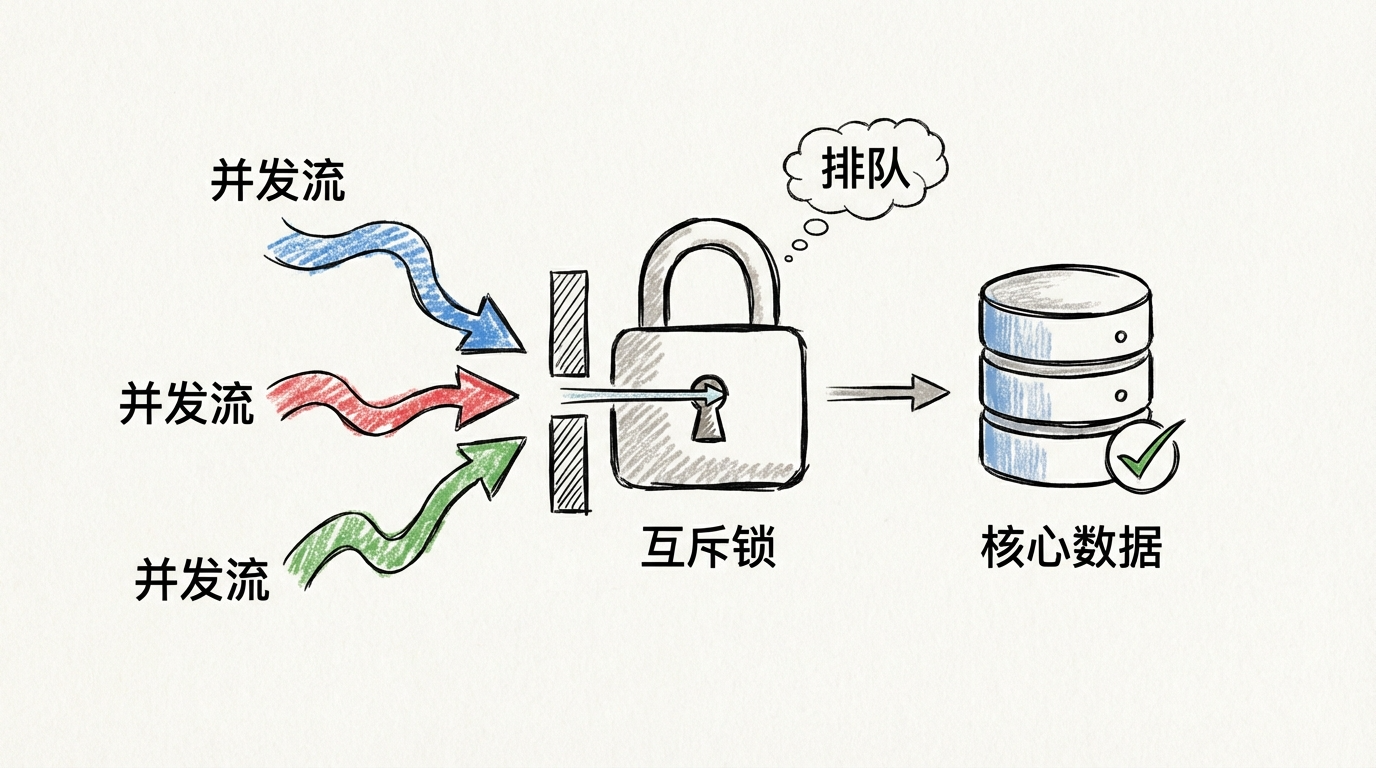
SELECT ... FOR UPDATE is a pessimistic locking mechanism provided by MySQL’s InnoDB engine. Its core semantics are simple:
When executing a SELECT within a transaction, it places an exclusive lock (X lock) on the matched rows. Other transactions that want to lock the same rows must wait until the current transaction ends.
Key points:
- It locks rows, not the table (as long as an index is hit)
- The lock is released when the transaction ends (COMMIT / ROLLBACK), not when the statement ends
- It must be used within a transaction — otherwise the lock is released immediately and serves no purpose
With the lock in place, the concurrent flow becomes:
Request A: Begin tx → FOR UPDATE locks user row → No duplicate found → Create application → Commit, release lock
Request B: Begin tx → FOR UPDATE locks user row → Waiting... (blocked)
Request B:                                       → Acquires lock → Finds existing application → Reject → Rollback
“Validation + creation” is now serialized. Problem solved.
3. Real-World Code: Implementation in an HR System
Our HR system backend uses NestJS + Prisma + MySQL, with many application-type workflows: regularization, resignation, leave, overtime, business trips, attendance corrections, etc. Each type needs duplicate submission prevention.
Core locking method (application.service.ts):
/**
 * Concurrency guard for application creation:
 * locks the applicant's row to serialize "validation + creation"
 */
private async lockApplicantRowForUpdate(
  tx: Prisma.TransactionClient,
  applicantId: number
) {
  await tx.$queryRaw`
    SELECT id FROM users WHERE id = ${BigInt(applicantId)} FOR UPDATE
  `;
}
Just one line of SQL, but it’s the cornerstone of the entire concurrency guard. Usage in regularization applications:
async createRegularizationApplication(applicantId: number, dto) {
  const result = await this.prisma.$transaction(async (tx) => {
    // Step 1: Lock the applicant's row to block concurrent requests for the same user
    await this.lockApplicantRowForUpdate(tx, applicantId);

    // Step 2: Business validation (now serialized, no concurrency issues)
    const user = await tx.user.findUnique({ where: { id: BigInt(applicantId) } });
    this.assertEligibleForRegularizationApplication(user);

    // Step 3: Duplicate check
    await this.assertNoDuplicateApplication(tx, applicantId, 'regularization');

    // Step 4: Create the application record
    const application = await tx.application.create({ ... });
    return application;
  });
  return result;
}
This pattern is reused 9 times across the project, covering all application types:
| Application Type | Duplicate Prevention Rule |
|---|---|
| Regularization | Blocked if pending/in-review exists; permanently blocked if already approved |
| Resignation | Blocked if pending/in-review/approved exists |
| Leave | Blocked if pending/in-review exists |
| Overtime | Blocked if pending/in-review exists |
| Business Trip | Blocked if unclosed trip record exists |
| Attendance Correction | Blocked if pending/in-review exists |
| Onboarding | ID number must be unique |
The duplicate rules differ per type, but the locking strategy is identical: lock the user row first, then validate, then write.
4. Why Lock the Users Table Instead of the Applications Table?
This is a design decision worth thinking about.
We lock the applicant’s row in the users table, not the applications table. Here’s why:
1. The duplicate check dimension is “person”, not “application”
The business rule is “the same person cannot submit duplicate applications of a given type.” The lock granularity should match the validation granularity.
2. The application record doesn’t exist yet
Under concurrency, neither request has created an application record yet — there’s nothing to lock in the applications table. But the users table record is guaranteed to exist.
3. Primary key query = smallest lock granularity
WHERE id = ? FOR UPDATE hits the primary key index, so InnoDB only locks that single row without affecting other users’ operations.
5. Pitfall Log: Details That Will Bite You
Pitfall 1: No index = row lock becomes table lock
InnoDB’s row locks are index-based. If the WHERE condition doesn’t hit an index, the lock scope expands dramatically.
-- Hits primary key index, locks only one row (recommended)
SELECT id FROM users WHERE id = 1001 FOR UPDATE;

-- No index on this field, may lock many rows or even the entire table (dangerous)
SELECT id FROM users WHERE phone = '13800138000' FOR UPDATE;
Rule: Always ensure the FOR UPDATE WHERE clause hits a primary key or unique index.
Pitfall 2: Time-consuming operations inside the transaction
Lock hold time = transaction duration. If you call external APIs, send emails, or run heavy computations inside the transaction, the lock is held for that entire time, and all other requests queue up.
// Bad: calling external service inside the transaction
await this.prisma.$transaction(async (tx) => {
  await this.lockApplicantRowForUpdate(tx, applicantId);
  await this.sendEmailNotification();  // Could take seconds, lock never releases!
  await tx.application.create({ ... });
});

// Good: only do the minimum necessary DB operations inside the transaction
const result = await this.prisma.$transaction(async (tx) => {
  await this.lockApplicantRowForUpdate(tx, applicantId);
  return await tx.application.create({ ... });
});
await this.sendEmailNotification();  // Send email outside the transaction
Principle: Only do the minimum necessary reads and writes while holding the lock.
Pitfall 3: Deadlocks
When multiple transactions cross-lock different resources, deadlocks can occur:
Transaction A: Lock user 1 → Waiting for lock on user 2...
Transaction B: Lock user 2 → Waiting for lock on user 1...
Mitigation strategies:
- Fixed locking order: Always lock by user ID in ascending order
- Shorten transaction time: Reduce lock hold duration
- Deadlock retry: Catch the deadlock error code, wait briefly, then retry
Pitfall 4: Gap locks under RR isolation level
Under MySQL’s default REPEATABLE READ isolation level, range queries with FOR UPDATE trigger Next-Key Locks, which lock not only the records themselves but also the “gaps” between records.
-- This statement may lock more than just the row where id=1001
-- It may also lock gaps in a range of id values
SELECT * FROM applications WHERE user_id = 1001 FOR UPDATE;
This is why we lock the primary key row in the users table — equality queries on primary keys have the most precise lock scope.
6. FOR UPDATE Is Not a Silver Bullet
SELECT ... FOR UPDATE is powerful, but it has clear boundaries:
Good fit:
- Resource contention within a single database transaction
- Concurrent serialization with a clear primary key
- Inventory deduction, balance changes, idempotent duplicate prevention
Not a good fit:
- Cross-database or cross-service distributed locks → Use Redis / ZooKeeper / etcd
- High-throughput write hotspots (many requests locking the same row) → Consider optimistic locking or queue-based throttling
- Global task scheduling locks → Use distributed lock middleware
Quick reference:
| Scenario | Recommended Approach |
|---|---|
| In-transaction resource contention with a clear primary key | SELECT ... FOR UPDATE |
| Low conflict probability, high throughput needed | Optimistic locking (version field) |
| Cross-service global mutual exclusion | Redis / ZK / etcd distributed lock |
The ultimate principle: Ensure consistency first, then optimize for performance.
7. Summary
Back to the bug from the beginning. The fix was essentially one line of SQL:
SELECT id FROM users WHERE id = ? FOR UPDATE;
But to use it well, you need to understand the principles behind it:
- Why lock: Eliminate the concurrency time window in “check-then-write” patterns
- What to lock: Lock the row corresponding to the business validation dimension, using a primary key index hit
- How long: The lock is held until the transaction ends, so keep transactions as short as possible
- When not to use it: Cross-service scenarios, high-throughput hotspots, distributed coordination
Database locking isn’t rocket science, but it’s the last line of defense for data consistency. I hope this article helps you avoid a few pitfalls in your own projects.
Welcome to follow the WeChat official account FishTech Notes to exchange tips and experiences!