How I Use Every Claude Code Feature
1/25/2026
This post is translated from Shrivu Shankar’s article “How I Use Every Claude Code Feature”
Original: https://blog.sshh.io/p/how-i-use-every-claude-code-feature
Preface
As a heavy user of AI developer tools, I use Claude Code many times per week in personal projects. At work, I help build AI tooling platforms that process billions of tokens every month.
In the CLI agent space, Claude Code, Gemini CLI, Cursor, and Codex CLI are competing hard. But in conversations with developers, I found choices are often driven by a “lucky” feature or preference for system prompt style, not deep technical differences.
After months of intensive use, I decided to share how I use the Claude Code ecosystem. This covers nearly every feature I use (and some I do not), from CLAUDE.md and custom slash commands to subagents, Hooks, and GitHub Actions.
Note: This is long. Use it as a reference guide, not a one-sit read.
1. CLAUDE.md: the “constitution” of your project
CLAUDE.md is the most important file for effective Claude Code usage. It is your agent’s constitution and the primary guide to how your repo works.
Use cases
Personal projects: I let Claude write anything freely.
Professional projects: Our monorepo CLAUDE.md is strictly maintained and about 13KB today (likely growing to 25KB).
Maintenance strategy
- Document tools and APIs used by at least ~30% of engineers (others live in product or library markdown files)
- Assign a max token budget per internal tool doc, like “selling ad space.” If you cannot explain a tool concisely, it should not be in
CLAUDE.md.
Writing philosophy
Over time we found these principles:
1. Start from guardrails, not a manual
Write CLAUDE.md based on mistakes Claude makes, not a full handbook.
2. Do not just @ reference docs
It is tempting to mention a doc file. But @ inlines the entire file and bloats context, and just listing a path is often ignored. You must sell why and when to read it:
“For complex … usage or
FooBarError, seepath/to/docs.mdfor advanced troubleshooting.”
3. Do not only say “never”
Avoid negative-only rules like “never use --foo-bar.” If the agent believes it must use it, it gets stuck. Always give an alternative.
4. Treat CLAUDE.md as a forcing function
If a CLI command is complex, do not document it with paragraphs. That is fixing a human problem. Instead, write a simple wrapper with a clean API and document that. Keeping CLAUDE.md short forces simplification of tooling.
Simplified example
# Monorepo

## Python
- Always ...
- Use <command> for tests
... 10 more ...

## <Internal CLI tool>
... 10 bullets focused on 80% use cases ...
- <example>
- Always ...
- Never <x>, prefer <Y>

For <complex usage> or <error>, see path/to/<tool>_docs.md
Key idea: treat CLAUDE.md as curated guardrails and pointers. Use it to identify where you should invest in AI-friendly tooling, not as a full manual.
2. Context management: the context command
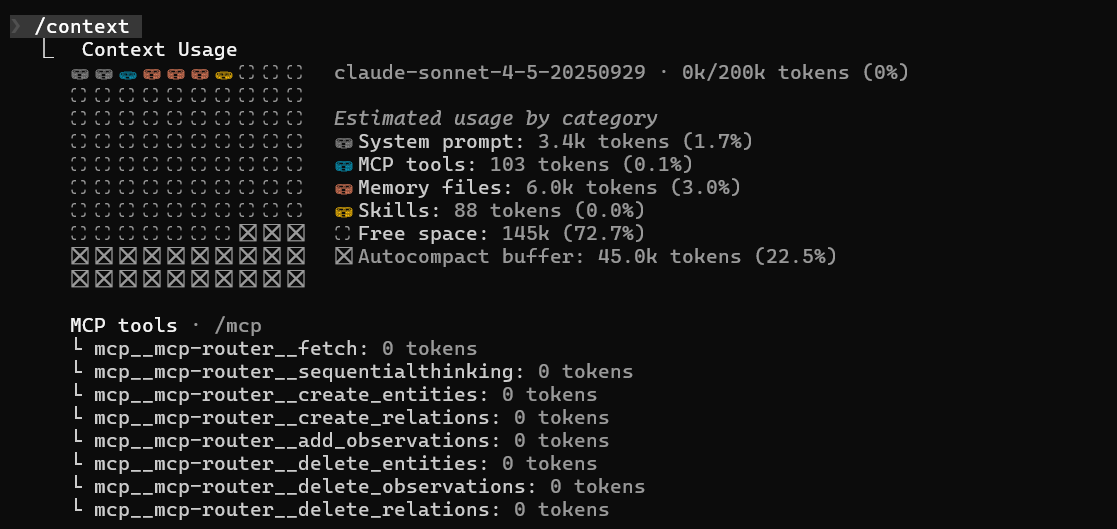
I recommend running /context at least once per session to understand how your 200k context window is used (even with Sonnet-1M, I do not believe the full window is used effectively).
For us, a new monorepo session baseline costs about 20k tokens (10%), leaving 180k for edits - which fills up fast.
Three main workflows
1. /compact (avoid)
I avoid it. Auto compression is opaque, error-prone, and poorly optimized.
2. /clear + /catchup (simple restart)
My default. I /clear, then run a custom /catchup that makes Claude read all changed files in my git branch.
3. “Document + clear” (complex restart)
For large tasks. I have Claude dump its plan/progress into a .md, /clear, then start a new session that reads the .md and continues.
Key idea: do not trust auto compression. Use /clear for simple restarts and “document + clear” for complex tasks.
3. Slash commands: simple shortcuts
I treat slash commands as short, personal shortcuts - nothing more.
/catchup: read all changed files in my current branch/pr: cleanup, stage, and prep a PR
If you build a long list of complex slash commands, you create an anti-pattern. The point of agents is to accept almost any input and produce useful results. Forcing users to memorize a magic list defeats that.
Key idea: use slash commands for simple personal shortcuts, not as a replacement for better CLAUDE.md and tooling.
4. Subagents: main-clone vs lead-expert
In theory, custom subagents are Claude Code’s strongest context management tool. A task needs X tokens of input, Y tokens of work context, and outputs Z tokens. N tasks cost (X + Y + Z) * N in your main context.
Subagents delegate (X + Y) * N work to specialists and only return Z, keeping the main context clean.
Problems in practice
Custom subagents create two new issues:
1. They gate context
If I create a PythonTests subagent, my main agent no longer has test context. It must call the subagent just to validate its own code.
2. They force human workflows
Worse, they impose a rigid, human-defined workflow. I tell the agent how to delegate, which is exactly what I want the agent to figure out.
My alternative
I prefer using the built-in Task(...) to spawn generic clones. I keep key context in CLAUDE.md and let the main agent decide when to delegate to its own copies. This gives the context savings without the downsides. I call this the “main-clone” architecture and strongly prefer it over the “lead-expert” model.
Key idea: custom subagents are brittle. Give your main agent context and let it manage delegation via Task/Explore(...).
5. Session management: resume and continue
At a simple level, I use claude --resume and claude --continue often. They are great for recovering broken terminals or continuing old sessions. I also resume older sessions to ask how Claude solved specific errors, then use that to improve CLAUDE.md and tools.
At a deeper level, Claude Code stores all session histories under ~/.claude/projects/. I run meta-analysis scripts over these logs to spot common errors, permission requests, and patterns to improve agent-facing context.
Key idea: use --resume and --continue to reboot sessions and mine historical context.
6. Hooks: enforced rules
Hooks are critical. I do not use them in hobby projects, but in complex enterprise repos they are essential. They are deterministic “musts” that complement the “shoulds” in CLAUDE.md.
Two types we use
1. Pre-commit blocking hooks
Our main strategy. A PreToolUse hook wraps any Bash(git commit). It checks for /tmp/agent-pre-commit-pass, which is only created if all tests pass. If missing, the hook blocks the commit and forces a test-and-fix loop.
2. Prompt hooks
Lightweight, non-blocking hooks that provide quick feedback when the agent does something suboptimal.
Hooks we intentionally avoid
We do not use “write-blocking” hooks (on Edit/Write). Blocking mid-plan confuses or “frustrates” the agent. Let it finish, then validate at commit time.
Key idea: enforce validation at commit time. Avoid blocking writes mid-plan.
7. Plan mode: align expectations
For any large feature change in an AI IDE, planning is mandatory.
Personal projects
I use the built-in plan mode to align before Claude starts. It defines checkpoints where Claude stops and shows work. Frequent use builds intuition for the minimum context needed for a good plan.
Enterprise projects
In our monorepo, we built a custom planning tool using the Claude Code SDK. It mirrors plan mode but is heavily prompted to match our internal design doc format and best practices (from code structure to privacy/security). It lets engineers “riff” new features like staff architects.
Key idea: always use plan mode for complex changes to align before work begins.
8. Skills: formalizing the scripted agent model
I agree with Simon Willison: Skills may be more important than MCP.
I have moved away from MCP for most dev workflows and prefer simple CLIs (as I argued in “AI cannot read your docs”). My model of agent autonomy evolved in three phases:
1. Single prompt: cram all context into one prompt (fragile, not scalable)
2. Tool calling: classic agent model, abstract reality into tools (better, but creates new abstractions and context bottlenecks)
3. Scripted: give agents raw environment access (binaries, scripts, docs) and let them write code to interact with it
In this model, Agent Skills are the obvious next step. They formalize the “scripted” layer. If you already prefer CLIs over MCP, you have been getting the benefits of Skills implicitly. SKILL.md just makes those CLIs and scripts more organized, shareable, and discoverable.
Key idea: Skills are the right abstraction. They formalize the scripted agent model, which is more powerful and flexible than MCP’s API-like model.
MCP’s new role
Skills do not mean MCP is dead. Many MCP servers are bloated, mirroring REST APIs with dozens of tools (read_thing_a(), read_thing_b(), etc.).
The scripted model is better but needs safe access to the environment. That is MCP’s focused role. MCP should not be a bloated API. It should be a simple, secure gateway with a few powerful tools:
download_raw_data(filters…)take_sensitive_gated_action(args…)execute_code_in_environment_with_state(code…)
In this model, MCP handles auth, networking, and security boundaries, then gets out of the way. It gives the agent entry points, and the agent does the rest via scripts and markdown context.
The only MCP I still use is Playwright because it is stateful. All stateless tools (Jira, AWS, GitHub) have moved to simple CLIs.
Key idea: use MCP as a data gateway with a few high-level tools. Let the agent script the rest.
9. Claude Code SDK: a general agent framework
Claude Code is not just an interactive CLI. It is also a powerful SDK for building new agents, for coding and non-coding tasks. I now use it as my default agent framework instead of LangChain/CrewAI for most new side projects.
Three main use cases
1. Massive parallel scripts
For large refactors, bug fixes, or migrations, I avoid chat. I write simple bash scripts that call claude -p "in /pathA change all refs from foo to bar" in parallel. It scales better than a single agent orchestrating many tasks.
2. Internal chat tools
The SDK is great for wrapping complex processes behind a simple chat UI for non-technical users. Example: an installer that falls back to Claude Code SDK to fix issues. Or an internal “home v0” tool so design teams can prototype in our UI framework and get high-fidelity code.
3. Rapid agent prototyping
My most common use. Not only for coding. If I have an idea (e.g., a threat investigation agent using custom CLIs or MCP), I prototype quickly with the SDK before committing to full scaffolding.
Key idea: Claude Code SDK is a powerful general agent framework. Use it for batch code, internal tools, and rapid prototyping.
10. GitHub Actions: the ultimate operationalization
Claude Code GitHub Action (GHA) is one of my favorite and most underrated features. The idea is simple: run Claude Code in GHA. That simplicity is why it is powerful.
It is similar to Cursor background agents or Codex hosted UI, but far more customizable. You control the container and environment, get more data access, and have stronger sandbox and audit controls. It supports advanced features like Hooks and MCP.
How we use it
We built a custom “create PR from anywhere” tool. Users can trigger PRs from Slack, Jira, or CloudWatch alerts. GHA fixes the issue or adds features and returns a fully tested PR.
Since GHA logs are complete agent logs, we review them regularly for errors, bash issues, or inconsistent engineering practices. This creates a data-driven flywheel: errors -> better CLAUDE.md/CLI -> better agents.
$ query-claude-gha-logs --since 5d | claude -p "find what other Claudes struggled with and fix it, then submit PRs"
Key idea: GHA is the ultimate operationalization. It turns Claude Code from a personal tool into a core, auditable, self-improving system component.
11. Advanced config: settings.json
I rely on a few settings.json values for both personal and professional work:
1. HTTPS_PROXY/HTTP_PROXY
Great for debugging. I use it to inspect raw traffic and prompts. It is also a powerful network sandbox for background agents.
2. MCP_TOOL_TIMEOUT/BASH_MAX_TIMEOUT_MS
I raise these values. I run long, complex commands and default timeouts are too conservative. I keep this even though background bash tasks may reduce need.
3. ANTHROPIC_API_KEY
At work, we use a company API key (via apiKeyHelper). It shifts us from per-seat licensing to usage-based pricing, which fits our workflows better.
- It accounts for huge differences in usage (we see 1:100 variance between engineers)
- It lets engineers use non-Claude Code LLM scripts under a single enterprise account
4. "permissions"
I periodically audit the list of auto-allowed commands.
Key idea: your settings.json is a powerful place for advanced customization.
Summary
This is a lot, but I hope it helps. If you are not using CLI agents like Claude Code or Codex CLI, you probably should. These advanced features have few good guides. The only way to learn is to practice deeply.
Key takeaways
- CLAUDE.md: keep it concise, start with guardrails
- Context: use
/clear+/catchup, avoid auto compression - Slash commands: simple personal shortcuts
- Subagents: use built-in
Task(...), avoid custom subagents - Hooks: enforce at commit time, not on write
- Plan mode: use for complex tasks to align upfront
- Skills vs MCP: prefer scripted model, MCP as secure gateway
- SDK: batch scripts, internal tools, rapid prototyping
- GitHub Actions: operationalize with audit and improvement loop
Original author: Shrivu Shankar
Original published: Nov 2, 2025
Translation date: Jan 25, 2026
欢迎关注公众号 FishTech Notes,一块交流使用心得!