Deep Dive into Java IO Models: BIO, NIO, and AIO Explained
1/27/2026
“Can you explain the differences between BIO, NIO, and AIO?”
This question is a classic in Java interviews and tech chats. The real test is not memorizing definitions, but understanding the evolution.
Today, we will do a full, structured breakdown.
1. Start with a story: the evolution of a restaurant waiter
Imagine you run a restaurant and handle customer orders.
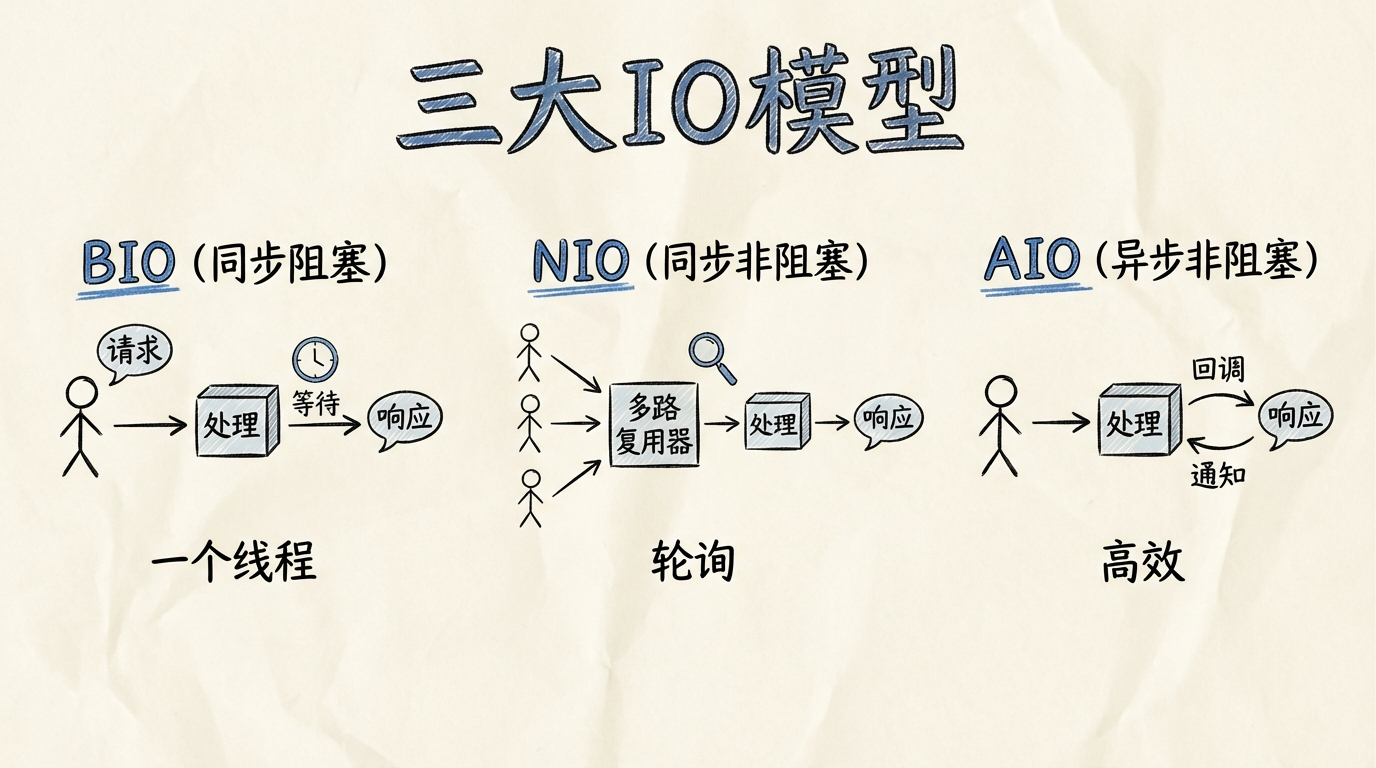
BIO era: one waiter serves one table. While the customer reads the menu, the waiter waits. Ten tables? Hire ten waiters.
NIO era: one waiter watches multiple tables. They keep scanning, and when a table raises a hand, they serve. One waiter can handle ten tables.
AIO era: every table has a call bell. Customers press the bell when ready. The waiter can do other work and only responds when notified.
That is the essence of the three IO models.
2. Java IO evolution timeline
JDK 1.0 (1996)  →  BIO, java.io
JDK 1.4 (2002)  →  NIO, java.nio
JDK 1.7 (2011)  →  NIO.2/AIO, async IO support
Why evolve? The internet exploded.
BIO handled dozens of connections fine. But when connections jumped to thousands, one thread per connection crushed servers.
3. BIO: synchronous blocking IO
3.1 How it works
// Server example
ServerSocket serverSocket = new ServerSocket(8080);
while (true) {
    // Block until connection
    Socket socket = serverSocket.accept();
    // One thread per connection
    new Thread(() -> {
        InputStream is = socket.getInputStream();
        byte[] buffer = new byte[1024];
        // Block on read
        int len = is.read(buffer);
        // Handle data...
    }).start();
}
3.2 Core characteristics
| Feature | Description |
|---|---|
| Thread model | one connection per thread |
| Blocking points | accept() and read() block |
| Best for | low concurrency, few connections |
| Problems | thread exhaustion, context switching cost |
3.3 Why BIO fails at high concurrency
Two fatal issues:
- Limited threads: 10k connections means 10k threads. Memory explodes.
- Context switching overhead: CPU spends time switching instead of doing work.
4. NIO: synchronous non-blocking IO
4.1 Three core components
Channel: bidirectional data pipe, replaces Stream
Buffer: staging area for data
Selector: the soul of NIO, one thread monitors many channels
// NIO server core
Selector selector = Selector.open();
ServerSocketChannel serverChannel = ServerSocketChannel.open();
serverChannel.configureBlocking(false);
serverChannel.register(selector, SelectionKey.OP_ACCEPT);

while (true) {
    // Block until events
    selector.select();
    Set<SelectionKey> keys = selector.selectedKeys();
    for (SelectionKey key : keys) {
        if (key.isAcceptable()) {
            // handle new connection
        } else if (key.isReadable()) {
            // handle read
        }
    }
}
4.2 IO multiplexing implementations
| OS | Implementation | Notes |
|---|---|---|
| Linux | epoll | event-driven, O(1) |
| macOS | kqueue | similar to epoll |
| Windows | select/IOCP | select is slower |
Quick explainer: select vs poll vs epoll
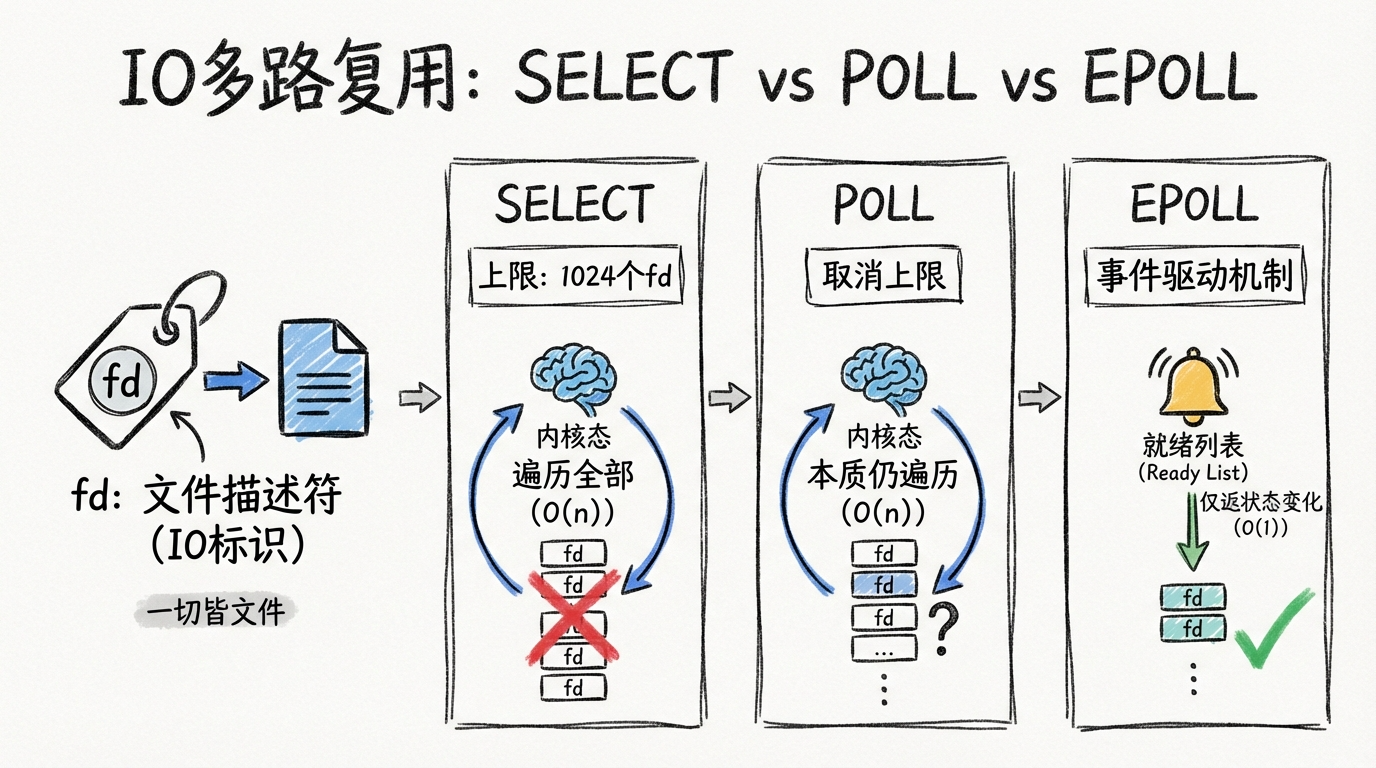
First, a key concept: fd (file descriptor).
Think of a bank ticket number. The bank staff does not know you, but they can call your number. The OS gives each connection a number (fd). Programs use it to read/write.
With that in mind:
- select: max 1024 fds, copies all fds from user to kernel each call, scans all fds
- poll: removes the 1024 limit, but still scans all fds, O(n)
- epoll: event-driven, kernel keeps a ready list, only returns changed fds, O(1)
4.3 Key points
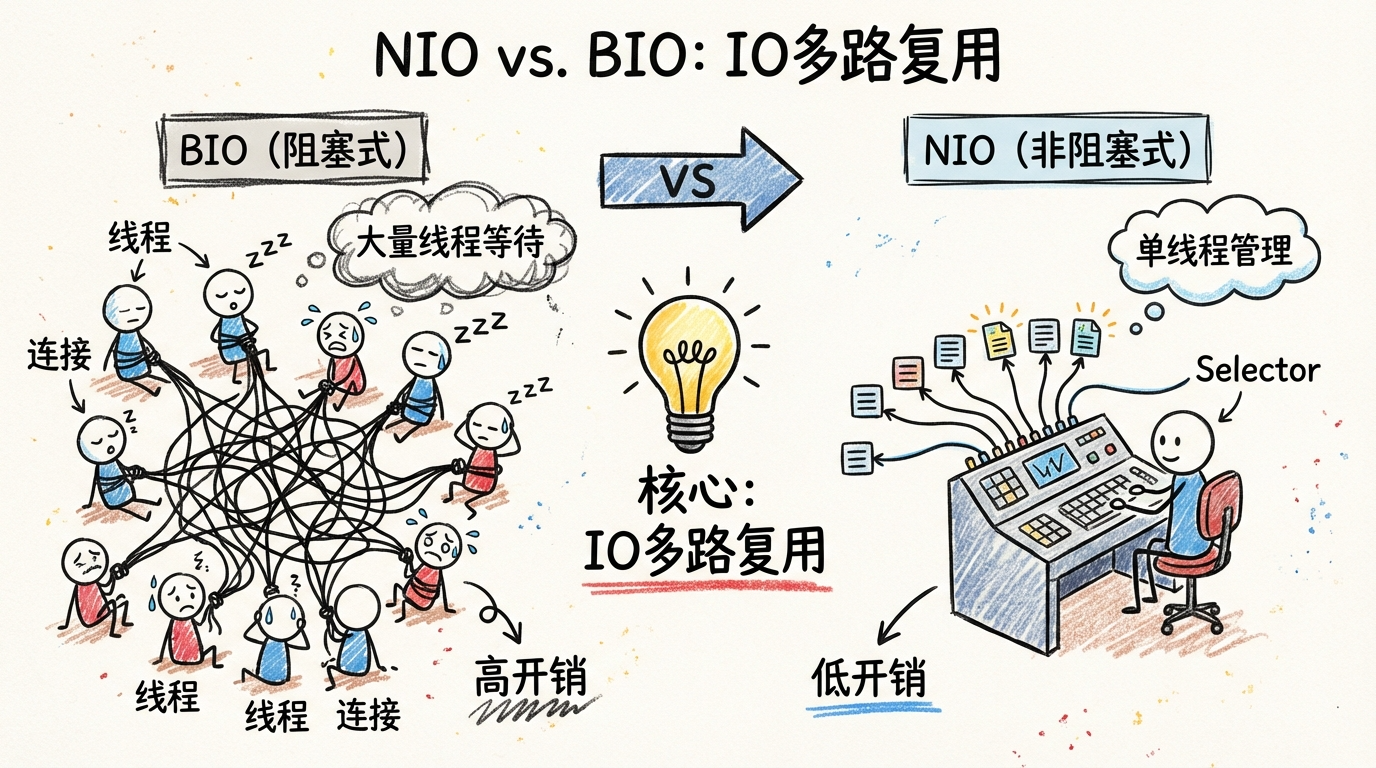
Q: Why is NIO faster than BIO?
A: IO multiplexing. One selector thread can manage thousands of connections. Only active connections are processed, avoiding massive thread creation and switching.
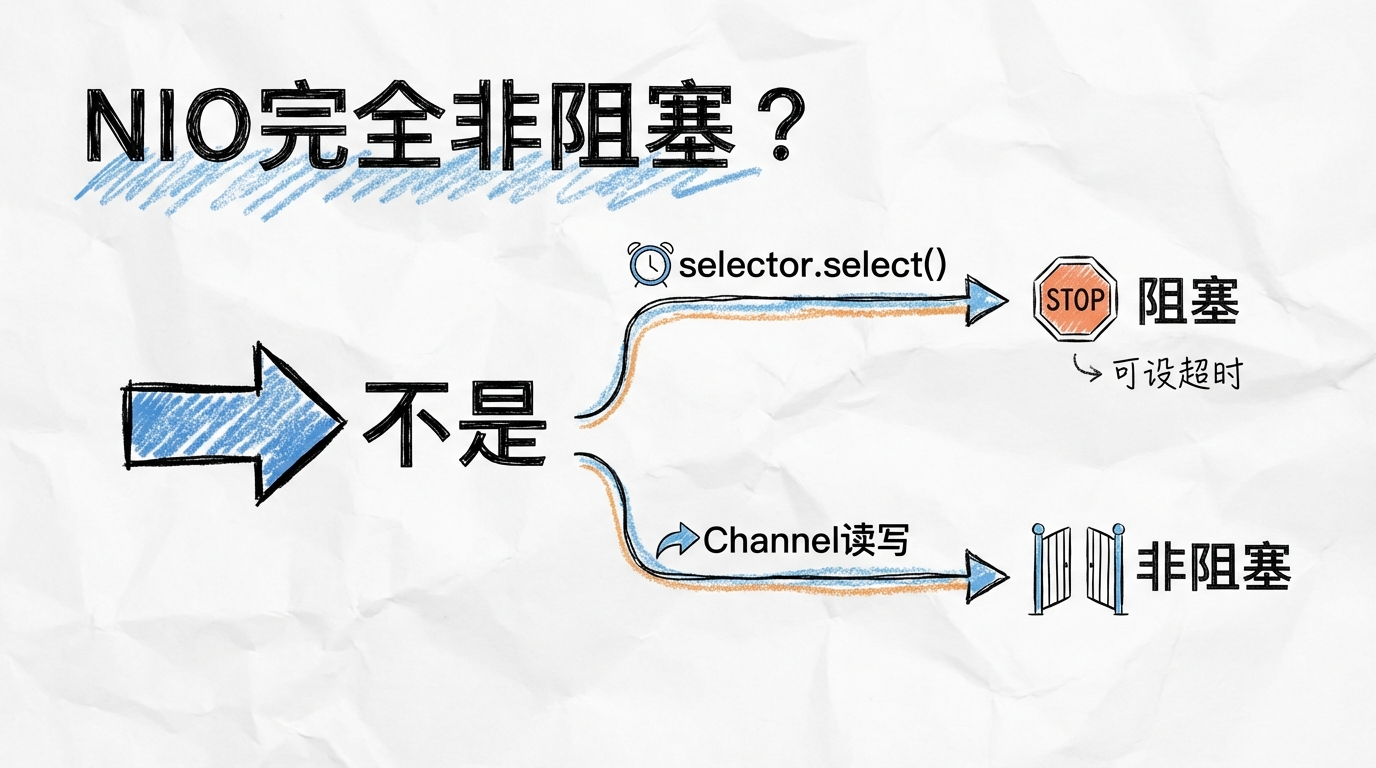
Q: Is NIO fully non-blocking?
A: Not fully. selector.select() blocks (can set timeout), but channel read/write is non-blocking.
5. AIO: asynchronous non-blocking IO
5.1 How it works
AIO (NIO.2) was added in JDK 7. It is true async IO: you start an IO operation and return immediately, the OS notifies you via callbacks when complete.
// AIO server example
AsynchronousServerSocketChannel serverChannel =
    AsynchronousServerSocketChannel.open();
serverChannel.bind(new InetSocketAddress(8080));

// Accept asynchronously
serverChannel.accept(null, new CompletionHandler<AsynchronousSocketChannel, Void>() {
    @Override
    public void completed(AsynchronousSocketChannel client, Void attachment) {
        serverChannel.accept(null, this);
        ByteBuffer buffer = ByteBuffer.allocate(1024);
        client.read(buffer, buffer, new CompletionHandler<Integer, ByteBuffer>() {
            @Override
            public void completed(Integer result, ByteBuffer buffer) {
                // handle data
            }
            @Override
            public void failed(Throwable exc, ByteBuffer buffer) {
                // handle error
            }
        });
    }
    @Override
    public void failed(Throwable exc, Void attachment) {
        // handle error
    }
});
5.2 NIO vs AIO
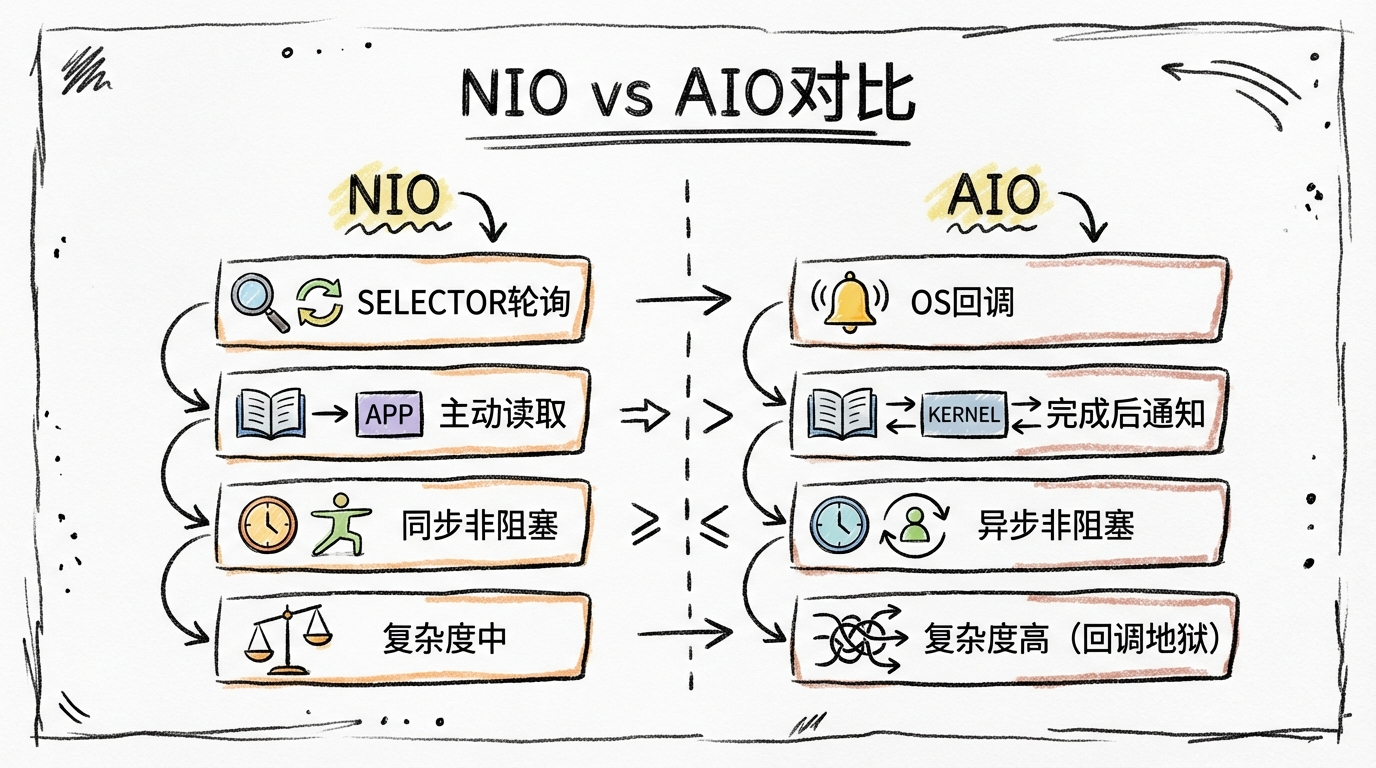
5.3 Why AIO is not widely adopted
- epoll is already efficient on Linux, AIO gives limited gains
- Callback hell makes code harder to maintain
- Netty chooses NIO + epoll on Linux
- Better on Windows (IOCP), but most Java servers run on Linux
6. In practice: how to choose
6.1 Scenario guide
| Scenario | Recommendation | Reason |
|---|---|---|
| Few connections (<100) | BIO | simple, low maintenance |
| High concurrency long connections | NIO + Netty | mature and stable |
| Async file operations | AIO | strong for file IO |
| Extreme performance | Netty | abstracts NIO complexity |
6.2 Netty: best practice for NIO
Why do big companies use Netty over raw NIO?
Raw NIO pain points:
├── complex API, steep learning curve
├── Selector empty polling bug (JDK famous issue)
├── manual packet framing
├── verbose exception handling
└── tricky memory management

Netty solutions:
├── elegant API
├── fixes epoll empty polling
├── built-in codecs
├── solid exception handling
└── zero-copy, pooling optimizations
6.3 Netty server config example
ServerBootstrap bootstrap = new ServerBootstrap();
bootstrap.group(bossGroup, workerGroup)
    .channel(NioServerSocketChannel.class)
    .option(ChannelOption.SO_BACKLOG, 1024)
    .childOption(ChannelOption.SO_KEEPALIVE, true)
    .childOption(ChannelOption.TCP_NODELAY, true)
    .childOption(ChannelOption.ALLOCATOR, PooledByteBufAllocator.DEFAULT);
7. Key takeaways
7.1 One-line distinctions
- BIO: one request per thread, blocking read
- NIO: one thread manages many connections, polls for ready data
- AIO: OS notifies you when data is ready
7.2 Quick answers
Q: Why is NIO faster?
A: IO multiplexing, fewer threads, less context switching.
Q: Core NIO components?
A: Channel, Buffer, Selector.
Q: epoll vs select?
A: select has 1024 limit and scans all fds, epoll has no limit and returns only ready fds.
Q: Why not AIO in Netty?
A: On Linux, AIO is still epoll under the hood and adds callback complexity.
8. Final note
From BIO to NIO to AIO, Java IO is an evolution in handling concurrency.
Understanding these models helps you answer interviews and, more importantly, make correct architecture choices. There is no best model, only the right one.
Next time someone asks, you can ask back: “Do you want the conceptual differences or the low-level implementation?”
欢迎关注公众号 FishTech Notes,一块交流使用心得!