Confused by uv, npm, SSE, and stdio? A Deep Dive into MCP and Spring AI Streaming Development
3/12/2026
Introduction
“Why does a single MCP involve so many terms like uv, npm, stdio, and SSE?”
Many people’s brains immediately get tangled when they first see SSE and Stdio in configuration pages: which ones are protocols, which are commands, and which are just startup methods? Plus, since SSE often appears in Spring AI development, many naturally ask: is this what they call streaming development?
Today’s article will break down these most easily confused concepts once and for all. After reading, you’ll at least be able to distinguish three things: what uv/npm is about, what stdio/SSE is about, and what the relationship is between “streaming output” in Spring AI and SSE.
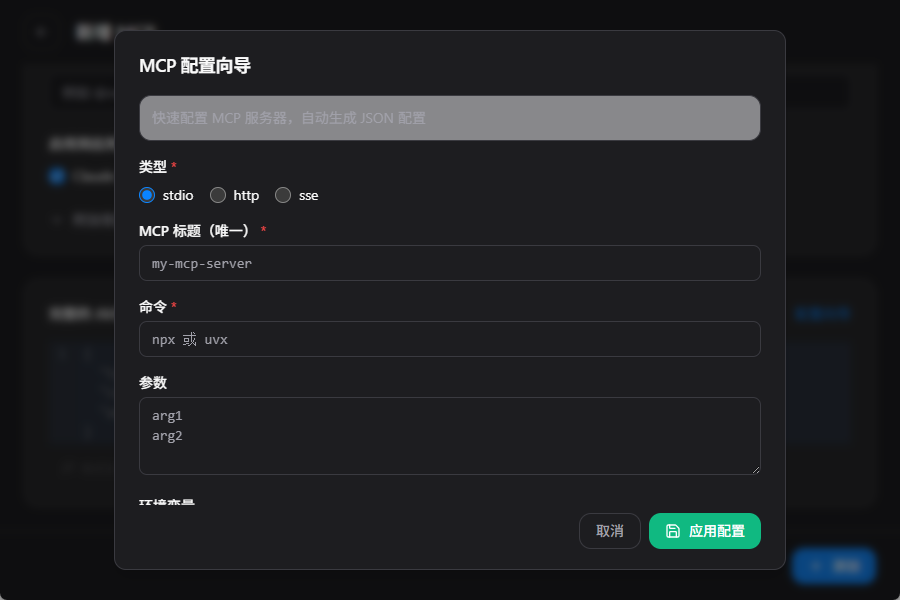
The Bottom Line - A Quick Overview
Much of the confusion stems from mixing “how to run” with “how to communicate.”
| Term You See | What It Essentially Is | What Problem It Solves |
|---|---|---|
uv | Python ecosystem tool/runner | Start or install Python-written MCP Servers |
npm / npx | Node.js package manager/runner | Start or install Node-written MCP Servers |
stdio | Process standard input/output communication | Let clients communicate with local subprocesses |
SSE | Server-Sent Events, unidirectional event stream over HTTP | Let servers continuously push messages to clients |
| Streamable HTTP | MCP’s current officially recommended HTTP transport | Enable MCP via standard HTTP, optionally with SSE streaming |
One-sentence summary: uv/npm is not the MCP protocol; stdio/SSE/Streamable HTTP belongs to the transport layer.
Why Everyone Gets Confused
Because in real configurations, these terms often appear together.
For example, a local MCP Server might be written in Python, so the client will use uv to start it; after starting, the client and this subprocess communicate JSON-RPC messages via stdio.
Another scenario is when an MCP Server runs independently in an HTTP service. In this case, what you see is often not a uv or npm configuration, but a URL. The client and server then communicate via HTTP transport. Here’s an important note: MCP officially replaced the old HTTP+SSE transport solution, not that SSE technology itself was deprecated. The official direction is now Streamable HTTP, and in this new transport, the server can still use SSE on demand to carry streaming messages.
In other words:
uv/npmsolves “how to run this service”stdio/SSE/HTTPsolves “how to communicate after it’s running”
These two levels are fundamentally different things.
What Exactly is stdio in MCP
stdio stands for standard input / standard output.
In MCP, its most typical scenario is: the client spawns a local subprocess, then exchanges JSON-RPC messages through this subprocess’s stdin/stdout.
Its characteristics are clear:
- Particularly suitable for local tool-type Servers, such as file systems, Git, local script capabilities.
- No need to open additional ports, simple deployment.
- Great developer experience for local use, but naturally biased toward “single machine, local process.”
So you’ll often see stdio configuration in many desktop clients, IDE plugins, and command-line tools.
What Exactly is SSE - Is It a Protocol
Yes, but more accurately, SSE is a server push mechanism and data format convention based on HTTP, not a specific framework’s proprietary implementation.
SSE stands for Server-Sent Events. The common browser-side interface is EventSource, and the content type returned by the server is typically:
text/event-stream
It has only two core characteristics:
- The connection stays open for a period of time.
- The server can continuously push events to the client.
So if you ask “Spring AI uses SSE, is that streaming development?” a more accurate answer would be:
It’s usually doing streaming transmission, but “streaming” is the capability, and SSE is one implementation method that carries this capability.
In other words, streaming output can be done with SSE, WebSocket, chunked responses, or even other bidirectional protocols. SSE is not synonymous with “streaming,” it’s just a very common solution in Web scenarios.
Version Update Push in Web Apps or Mini Programs - Is It Using SSE
Many people understand “SSE is the server continuously pushing events to the client,” and the next second they think of another common scenario:
So are the “new version detected, please refresh” notifications in Web Apps or mini programs also using SSE?
The answer is: possibly, but not necessarily.
Because “version update push” is a business requirement, and SSE is just one way to implement it, not the only answer.
In Web Apps, SSE Can Indeed Do Version Notifications
For example, if your frontend page stays open, once the backend detects a new version release, it can push an event via SSE:
event: version-update
data: {"version":"1.2.0","message":"New version available, please refresh"}
After the browser receives it, the frontend can pop up a prompt telling the user to refresh the page.
In such scenarios, SSE is very convenient because it naturally:
- Server-to-client unidirectional push
- Based on HTTP, simple frontend integration
- Great for “notification-type” messages
But Many Projects Won’t Use SSE
Because version update reminders typically don’t require the same real-time responsiveness as chat messages, many teams prefer simpler approaches:
- Poll the version number every 30 seconds or 1 minute
- Check static resource version once at page startup
- If the project already has a WebSocket connection, reuse WebSocket
- For PWA, might combine Service Worker for resource update prompts
So when you see “new version reminder” in a Web project, you can’t directly infer it definitely uses SSE.
Mini Program Scenarios Even Less Likely to Default to SSE
In mini programs, it’s more common to:
- Check version at startup
- Request API to get configuration
- Use WebSocket for message notifications
- Directly rely on the platform’s own update mechanism
The reason is simple: mini program runtime environments aren’t naturally designed around standard Web APIs like browsers. Many projects prefer more stable, universal methods from the platform rather than defaulting to SSE long connections.
So a more accurate statement would be:
Version update push is a type of business scenario, and SSE is just one optional implementation.
One-Sentence Memory Aid
You can remember it with this logic:
- Want “server unidirectionally notifies client”? SSE works
- Want “simple implementation, high compatibility”? Polling is sufficient
- Want “already have real-time bidirectional channel”? Just use WebSocket
In other words, when you see “version update notification,” you should first ask “how does it do update notification,” not assume “it must be using SSE.”
As of 2026-03-11 - What’s MCP’s Official Stance on SSE
Here’s a very critical time point.
As of March 11, 2026, MCP official documentation clearly states: the current standard transport mechanisms are stdio and Streamable HTTP. The official documentation also specifically notes that Streamable HTTP is a replacement for the old HTTP+SSE transport.
This means two things:
- If you see
Streamable HTTPin many new documents, this is the official main line. - But this doesn’t mean SSE is deprecated. In the
Streamable HTTPspecification, the server can either directly returnapplication/jsonor returntext/event-streamfor aPOSTrequest, meaning continue using SSE streaming to return multiple server messages.
So don’t interpret “official replacement of old HTTP+SSE transport” as “official prohibition of SSE.” A more accurate statement would be:
- What was replaced is the MCP old HTTP transport solution
- What wasn’t negated is SSE itself as a streaming carrier mechanism
If you still see SSE in some product interfaces, SDKs, or framework documentation, it’s usually just because it remains a very natural streaming output method.
Why SSE Often Appears in Spring AI
Because Spring AI itself supports both synchronous and streaming programming models.
The official documentation clearly states that ChatClient supports both regular calls and stream() returning Flux<String> type streaming models. At the Web layer, if you want to continuously push model-generated content segments to the frontend, SSE is a very convenient choice:
- Backend gets the model’s token/segment stream.
- Server continuously writes these segments to the HTTP response.
- Browser or frontend client continuously receives and refreshes the interface.
So in Spring AI projects, many people ultimately implement “model streaming output” via SSE interfaces.
But note this hierarchical relationship:
- Whether the model generates streaming output depends on the model interface and your calling method.
- How the backend sends streaming results to the frontend,
SSEis just one common option.
In other words, Spring AI’s “streaming development” doesn’t equal “SSE development,” but rather “streaming generation + some form of streaming transmission.” It’s just that in browser scenarios, SSE has become the most intuitively default answer.
What’s the Relationship Between Flux, SSE, WebSocket, and Streamable HTTP
This section is where many Java developers get stuck.
1. Flux is a Programming Model, Not a Network Protocol
In Spring AI, ChatClient.stream().content() returns Flux<String>, meaning: your code gets a reactive stream that “will continuously produce multiple data segments.”
So Flux answers:
- How your code consumes a stream of continuously arriving data
- How your service internally processes streams in a reactive way
It doesn’t answer “what network format these data are ultimately sent to the frontend in.”
2. SSE is a Streaming Output Format on HTTP
When you expose Flux to the browser, Spring WebFlux can directly return Flux<ServerSentEvent>, or directly return Flux under text/event-stream response. Spring MVC also has a dedicated SseEmitter.
So in the Spring tech stack, the most common link is actually:
LLM streaming output -> Spring AI gets the stream -> Express with Flux -> Web layer sends to browser via SSE
3. WebSocket is Another Real-time Transport Solution
If you don’t want to use SSE, you can also use WebSocket to carry streaming messages. The difference between it and SSE is:
- SSE is more “server continuously pushes to client”
- WebSocket is more “bidirectional real-time communication”
So chat scenarios don’t necessarily have to use SSE, it’s just that many “AI answer word-by-word output” pages find SSE simple enough.
4. Streamable HTTP is the MCP Transport Specification Name
Streamable HTTP is not a Spring AI concept, but a transport definition in the MCP protocol. It specifies:
- How MCP messages are sent via HTTP
POST/GET - How clients and servers establish sessions
- When the server can return JSON, when it can return SSE streams
So it’s not at the same level as Spring AI’s Flux and SSE.
One-Sentence Memory Aid
You can remember it like this:
Flux: Stream in codeSSE: Stream in HTTPWebSocket: Bidirectional real-time channelStreamable HTTP: A set of HTTP transport rules defined by MCP protocol, can still use SSE internally
OpenAI Enabled stream=true - Why Frontend Might Still Not Be Streaming
This is also particularly easy to misunderstand.
Many people see stream=true in the OpenAI API and their first reaction is:
“So if I just turn on this parameter in the backend, won’t the frontend naturally become streaming?”
The answer is: not necessarily.
Because there are at least two links here:
- Model service -> your backend
- Your backend -> your frontend
And stream=true only determines the first one.
First Link: OpenAI to Backend, Indeed Becomes Streaming
When you request OpenAI and enable stream=true, the model won’t wait for the entire content to be generated before returning it all at once, but will continuously send incremental content to your backend.
In other words, what becomes streaming at this point is:
OpenAI -> Your backend
Second Link: Backend to Frontend, Won’t Automatically Become Streaming
If your backend code receives the upstream stream but chooses to:
- First concatenate all the content
- Then assemble it into a regular JSON
- Finally
returnall at once
Then the frontend still sees a regular API response, not streaming output.
So what really determines “whether the user interface outputs word by word” is not just whether the model has streaming enabled, but also:
- Whether the backend preserves this stream
- Whether the backend continues to send it to the frontend via a streaming protocol
What Layer Does Spring AI Help You Encapsulate
What Spring AI does is fundamentally abstract the streaming responses from underlying model providers into reactive streams on the Java side.
For example, in Spring AI, you’ll often see:
chatClient.prompt().user("Hello").stream().content()
This type of call ultimately returns:
Flux<String>
Or more completely:
Flux<ChatResponse>
This shows Spring AI has already encapsulated “model streaming output” into streams in Java code.
Spring AI Alibaba is similar at this layer, essentially wrapping model incremental output into Flux<?> for you to consume.
But Flux Doesn’t Mean Frontend Has Received Streaming
Here’s the key:
Flux is just a stream abstraction in backend code, not equal to the browser already receiving streaming.
To make the frontend truly display streaming, you still need to do another layer of output at the Web layer, such as:
- Return
text/event-stream - Directly return
Flux<ServerSentEvent<?>> - Or write
Flux<String>back to browser via SSE - Or switch to WebSocket
In other words, Spring AI / Spring AI Alibaba helps you encapsulate:
- Model vendors’ streaming protocols
- Unified stream abstraction on the Java side
But they won’t automatically decide for you:
- How Controller exposes interfaces
- Whether frontend uses SSE or WebSocket
- Whether to keep streaming or aggregate and return all at once
A Link Diagram to Understand
You can understand the whole process like this:
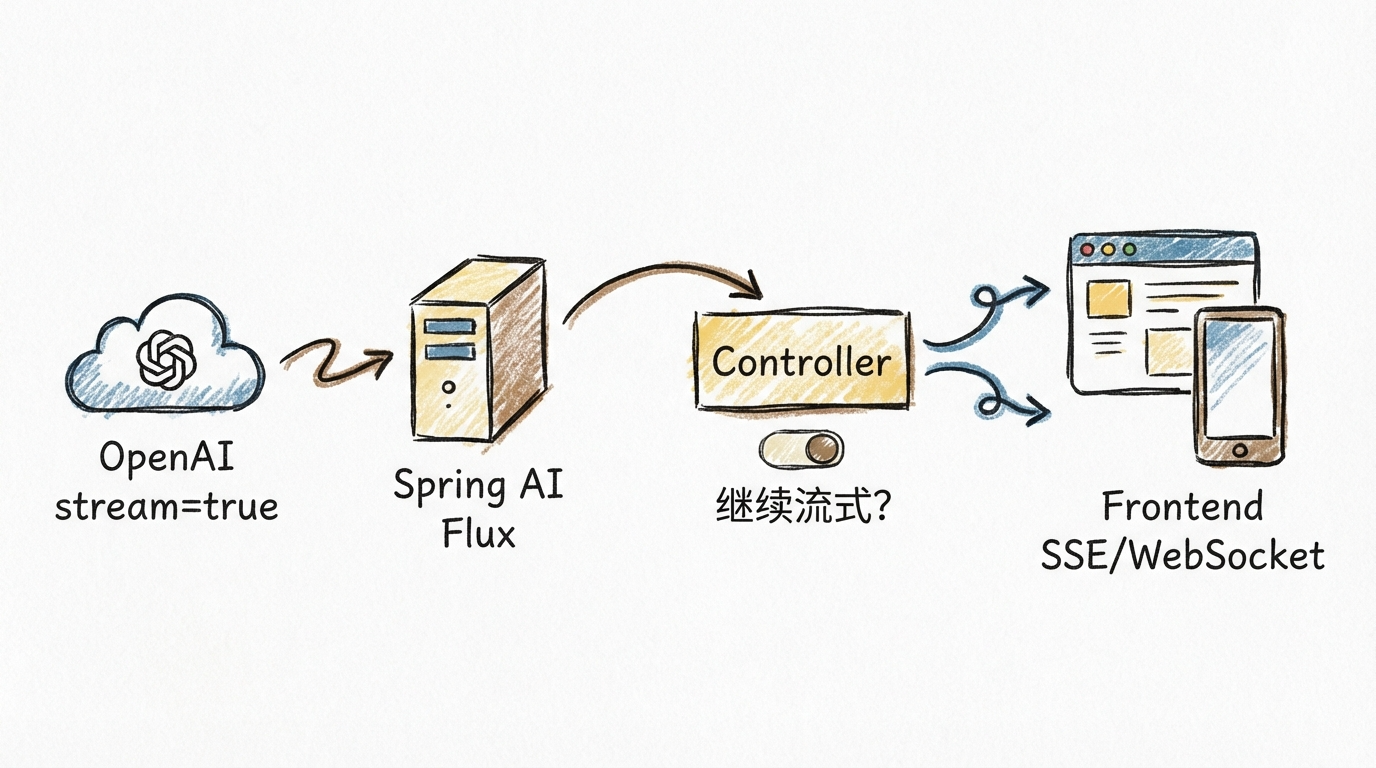
So the accurate statement should be:
stream=true only打通了 “model to backend” streaming link; whether frontend is streaming depends on whether the backend interface also outputs in a streaming manner.
Why I Clearly Used Flux - But Frontend Still Returns All at Once
This is almost the most common question among Spring AI beginners.
Many people say:
“I’ve already stream(), and the return value is Flux<String>, why does the frontend still see the whole thing come out at once at the end?”
The problem is usually not at the model layer, but at the Web output layer.
Common Cause 1: You Got Flux, But Then Collected It Into a Complete Result
For example, some code does something like this in the middle:
flux.collectList()
Or:
flux.reduce(...)
Once you collect the stream before returning, you’ve essentially turned “streaming” back into “one-time response.”
In other words:
Fluxis a stream- After
collectList(), it’s no longer segment-by-segment output, but waiting for everything to complete before returning together
Common Cause 2: Controller Didn’t Output in a Streaming Manner
Backend code internally being Flux doesn’t mean the HTTP response is naturally streaming.
If your interface just returns regular application/json, or doesn’t output in a streaming response manner like text/event-stream, many frontend environments will wait until the buffer accumulates, or even the entire response completes, before handing it to the page all at once.
So in browser scenarios, more common approaches are:
- Explicitly return
text/event-stream - Or return
Flux<ServerSentEvent<?>> - Or use WebSocket
Common Cause 3: Middle Layer Buffered Your Stream
Sometimes it’s not a Spring AI problem, not a Controller problem, but a layer in the link that “held onto” the streaming response.
Common scenarios include:
- Gateway buffering
- Nginx/proxy layer buffering
- Some testing tools default to waiting for complete response
- Frontend request library not consuming in a streaming manner
So when you see “returned all at once,” it doesn’t necessarily mean the backend isn’t streaming, it could be that the middle link cached the data before spitting it to the frontend.
Common Cause 4: You’re Using Spring MVC Regular Return Method
If the project is traditional Spring MVC, and the Controller returns an object or string using regular synchronous interface writing, even if it internally went through Flux, it might ultimately be aggregated at the MVC layer.
This is also why many people feel:
“I’ve clearly introduced Spring AI in my project, why is the frontend still not streaming?”
The answer is usually: Spring AI is responsible for encapsulating model output into a stream, but your Web layer didn’t send this stream out as-is.
A Most Practical Troubleshooting Approach
When encountering this problem, you can check just 4 things from top to bottom:
- Is the model call streaming-enabled, like
stream=true - Is what Spring AI gets a
Flux<?> - Does the Controller continue outputting via
SSE/text/event-stream/ WebSocket - Are gateway, proxy, frontend request method buffering the stream
One Sentence to Explain This Pit
Flux only indicates there’s a stream in your backend code, not that the browser definitely sees a stream.
For the frontend to truly receive content segment by segment, the entire link must support “don’t aggregate, continuously output.”
In Spring AI, Is It Netty, Flux, or Reactor - Will It Conflict with Spring WebMVC
This question is particularly typical because many people treat these terms as the same layer.
Actually, they belong to different levels:
Flux: is a reactive stream type- Reactor: is the reactive library behind Spring WebFlux,
FluxandMonocome from Reactor - Netty: is a network communication framework/runtime implementation, often chosen by WebFlux or
WebClientas the underlying HTTP client or server
So more accurately:
At the “streaming programming model” layer, Spring AI’s core is Reactor’s Flux; Netty is not synonymous with Spring AI streaming capability, nor is it a requirement.
Spring AI Streaming Capability Mainly Relies on Reactor
Spring AI official documentation is very clear about ChatClient.stream() return values, streaming responses are directly:
Flux<String>Flux<ChatResponse>Flux<ChatClientResponse>
This shows it adopts Reactor reactive abstraction at the Java code level.
In other words, the “streaming interface” that developers directly touch is usually not Netty API, but:
Flux<String>
Or:
Flux<ChatResponse>
Spring AI Alibaba is consistent on this point, with documentation also using Flux as the unified expression for streaming output.
Netty is More Like an Optional Underlying Runtime, Not an Object You Must Write
In the Spring ecosystem, what actually sends HTTP requests is often WebClient. Spring Framework official documentation clearly states that WebClient can interface with different HTTP client implementations at the bottom, such as:
- Reactor Netty
- JDK HttpClient
- Jetty Reactive HttpClient
- Apache HttpComponents
So you can understand:
- Reactor/Flux solves “how to express streams in code”
- Netty/JDK HttpClient/Jetty solves “who runs the underlying HTTP requests”
This is also why many projects clearly use Spring AI streaming capability, but you almost never see Netty in business code.
Will It Conflict with Spring WebMVC
Not necessarily conflicting, but depends on how you set it up.
Spring Framework official documentation clearly states that spring-webmvc and spring-webflux can coexist; applications can usually use only one, or use both in some scenarios, such as:
- Web layer is still Spring MVC Controller
- But HTTP client calls use reactive
WebClient
So from a framework level:
Spring AI using Reactor / Flux doesn’t mean your entire application must fully switch to WebFlux, nor does it mean it’s naturally opposed to Spring MVC.
But There’s an Important Detail in Actual Development
Spring AI official implementation notes mention several key points:
- Streaming responses are only supported through Reactive stack
- Imperative applications that want streaming capability need to bring in Reactive stack, like
spring-boot-starter-webflux - Non-streaming calls involve Servlet stack
- Some tool calls and regular call paths may still have blocking behavior
This means:
- You can be a Spring MVC project and still integrate Spring AI
- But if you want to use
stream(), you usually still need to bring in the reactive dependencies - “Can coexist” doesn’t mean “the entire link is naturally non-blocking from start to finish”
One Sentence to Explain This Relationship
You can remember it as:
- Spring AI streaming abstraction: Reactor
Flux - Spring AI underlying HTTP implementation: might be Netty, might not be
- Your Web interface layer: can be WebFlux, can be Spring MVC, but streaming scenarios usually离不开 Reactive stack
So the real question isn’t “is Spring AI Netty,” but:
At which layer does it use Reactor to express streams, who chose the underlying HTTP client, and how does your Controller ultimately plan to send the stream out.
How to Choose in Real Combat
If you’re doing MCP:
- Local tools, desktop integration, IDE plugins prioritize
stdio - Independent deployment, remote services, multi-client access prioritize
HTTP - If documentation mentions old
SSEtransport, check if it has migrated toStreamable HTTP
If you’re doing Spring AI Web applications:
- Just regular Q&A interfaces, synchronous return is enough
- Want “word-by-word output” chat experience, go with streaming output
- When frontend is browser,
SSEis often one of the easiest solutions
What Developers Should Remember Most is Not Terms, But Layered Thinking
Many technical terms once appearing together on one page are particularly confusing.
But after you really start doing projects, you’ll find the most valuable ability in engineering is never memorizing how many abbreviations, but when encountering a concept, first determining which layer it belongs to.
For example:
uv,npmbelong to “how to start service”stdio,SSE,HTTPbelong to “how to transmit messages”Fluxbelongs to “how to express streams in code”- “Streaming output” belongs to “what interaction experience user ultimately sees”
Once you have this layered awareness, many originally mysterious terms immediately become very plain.
You won’t ask “is Flux a protocol,” won’t interpret “Spring AI uses SSE” as “it can only do this at the底层,” and won’t misunderstand “configuration uses uv” as “this is MCP’s communication protocol.”
Truly mature engineering judgment is not memorizing a term, but first putting it back in the correct layer.
Final Summary
These concepts, what’s most feared is not having many, but mixing layers.
uv, npm talk about “how to run MCP Server”; stdio, SSE, Streamable HTTP talk about “how to communicate after running”; and streaming development in Spring AI talks about “whether content returns segment by segment continuously,” SSE is just its most common implementation in Web scenarios.
After truly separating the layers, you’ll find these terms aren’t complex at all: startup is startup, transport is transport, programming model is programming model, streaming is interaction experience.
Further Reading
MCP Official Transport Documentation: https://modelcontextprotocol.io/docs/concepts/transports
MCP 2025-03-26 Specification Transport Section: https://modelcontextprotocol.io/specification/2025-03-26/basic/transports
Spring AI MCP Overview: https://docs.spring.io/spring-ai/reference/api/mcp/mcp-overview.html
Spring AI ChatClient Streaming Response: https://docs.spring.io/spring-ai/reference/api/chatclient.html
Spring AI ChatModel Streaming Response: https://docs.spring.io/spring-ai/reference/api/chatmodel.html
Spring AI OpenAI Chat: https://docs.spring.io/spring-ai/reference/api/chat/openai-chat.html
Spring Framework WebClient: https://docs.spring.io/spring-framework/reference/web/webflux-webclient.html
Spring Framework WebFlux: https://docs.spring.io/spring-framework/reference/web/webflux.html
Spring Framework Reactive Libraries: https://docs.spring.io/spring-framework/reference/web/webflux-reactive-libraries.html
Spring WebFlux Return Values and text/event-stream:
https://docs.spring.io/spring-framework/reference/web/webflux/controller/ann-methods/return-types.html
MDN on SSE: https://developer.mozilla.org/en-US/docs/Web/API/Server-sent_events
Spring Framework on SseEmitter:
https://docs.spring.io/spring-framework/reference/web/webmvc/mvc-ann-async.html
OpenAI Streaming Official Documentation: https://platform.openai.com/docs/guides/streaming
Spring AI Alibaba ChatClient: https://java2ai.com/integration/chatclient/
Welcome to follow the WeChat Official Account FishTech Notes to exchange usage experiences!